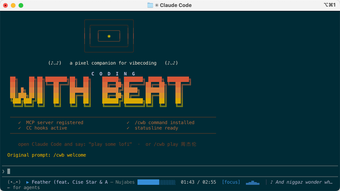
coding-with-beat brings reactive music control to AI terminals
coding-with-beat, by Jaychempan, converts AI-powered terminals into a music-aware control surface for developer sessions. The app routes natural-language requests through an MCP endpoint to manage playback and adjust terminal output in response to workflow signals. It pairs in-terminal visual feedback with synced lyrics and a 25/5 Focus timer to mark work intervals. The tool targets developers using MCP-capable assistants who want music and status tied directly to coding activity.
What tasks can you actually use it for?
The app functions as an MCP server and interactive music controller that exposes controls to AI assistants. It provides 38 specialized tools that let agents perform playback actions and track discovery. The system supports programmatic search and selection via a Smart Multi-Angle Search, for example by genre, mood, or artist. Typical tasks include automated track selection during builds, programmatic previews, and agent-driven playlist management.
How accurate is the music response to coding events?
Its Vibe Engine maps repository and runtime signals to audible and visual cues, adjusting mood and terminal graphics on events such as successful builds or failing tests. A pixel-art DJ Buddy updates in real time to reflect commit or test status, and the UI presents album art in ANSI blocks alongside a pseudo-spectrum equalizer for immediate feedback on state changes.
What file formats and music sources does it accept?
The app connects to multiple sources: Apple Music via AppleScript on macOS, QQ Music for search and preview, and local audio files played with afplay. Local playback and the MCP endpoint can operate offline; however, QQ Music search and the AI-driven smart search require an active internet connection. Supported input types therefore include streamed previews and standard local audio files.
Is it practical to add to a developer workflow?
Installation uses a one-line bootstrap script that configures an HTTP MCP endpoint and creates a local LaunchAgent on macOS, which simplifies background use. The tool expects an MCP-compliant host such as Claude Desktop, Cursor, or Claude Code. It also offers a "/cwb-profile" skill that analyzes play history and search patterns to produce daily, weekly, or yearly listening reports for workflow review.
A useful, niche tool for MCP-based terminal workflows
coding-with-beat suits developers who run AI assistants inside MCP-capable terminals and who host on macOS, because its music integrations use platform-specific hooks. Its dependency on an MCP host and on internet access for some searches narrows its audience. For those within that envelope, it provides a focused way to tie audible cues to development state; others may find the platform bindings restrictive.